Have you ever looked at a file permission like chmod 755 and wondered how a computer actually reads that? Or noticed that memory addresses in debuggers often show up as hex values like 0x1FF? Behind the scenes, octal to hex conversion is a small but critical operation that connects two number systems used constantly in real programming work. Whether you are writing shell scripts, reading memory dumps, or working with legacy code, knowing how to convert octal to hexadecimal cleanly and quickly is a skill that pays off. This guide breaks the whole process down step by step, with real examples, Python and C code, and a plain-English explanation that anyone can follow.
Content Table
Key Takeaways:
- Octal (base-8) and hexadecimal (base-16) are both shortcuts for binary - converting between them always goes through decimal or binary as a middle step.
- The fastest method is: octal to binary (3 bits per digit), then binary to hex (4 bits per group).
- Python handles this in one line; C requires a few more steps but gives you full control.
- Real use cases include Unix file permissions, color codes, and embedded memory addresses.
Why Number Systems Matter in Programming
Computers only understand binary (0s and 1s). But writing long strings of binary is painful for humans. So programmers use shorthand number systems to keep things readable. Number systems in programming like octal (base-8) and hexadecimal (base-16) are just compact ways of representing binary data.
Octal was popular in older Unix systems because it groups binary into sets of 3 bits, which maps neatly onto permission flags (read, write, execute). Hex became dominant in modern systems because it groups binary into sets of 4 bits, which matches the 8-bit byte structure of modern hardware perfectly. Today, you will often find yourself needing to convert octal to hex when bridging legacy code with modern tools, or when analyzing low-level system data.
Understanding base conversion in general also helps with related tasks. For example, if you work with color values, you might also need to handle decimal to hex conversion or even hex to RGB conversion for CSS colors.
Octal and Hex Explained Simply
What Is Octal (Base-8)?
Octal uses only 8 digits: 0, 1, 2, 3, 4, 5, 6, 7. When you count past 7, you roll over to the next column, just like decimal rolls over after 9. So octal 10 equals decimal 8. In code, octal numbers are often written with a leading zero, like 0755 in Unix file permissions.
What Is Hexadecimal (Base-16)?
Hexadecimal (hex) uses 16 symbols: 0-9 and then A, B, C, D, E, F for values 10 through 15. A single hex digit represents exactly 4 binary bits (a "nibble"). Two hex digits represent one full byte. That is why memory addresses and color codes like #FF5733 use hex - it is compact and directly maps to how computers store data.
The Bridge: Binary
The cleanest path between octal and hex runs through binary. Both systems are powers of 2 (2^3 = 8, 2^4 = 16), so binary is the natural bridge. You do not have to go through decimal at all, which avoids unnecessary rounding or confusion.
Step-by-Step Octal to Hex Conversion
Here is the standard two-step method for octal to hexadecimal conversion using binary as the bridge.
Method: Octal - Binary - Hex
- Write each octal digit as a 3-bit binary group. Every octal digit maps to exactly 3 binary bits.
- Join all the binary bits into one string. Remove any leading zeros at the front.
- Split the binary string into groups of 4, starting from the right. Pad with zeros on the left if needed.
- Convert each 4-bit group to its hex digit.
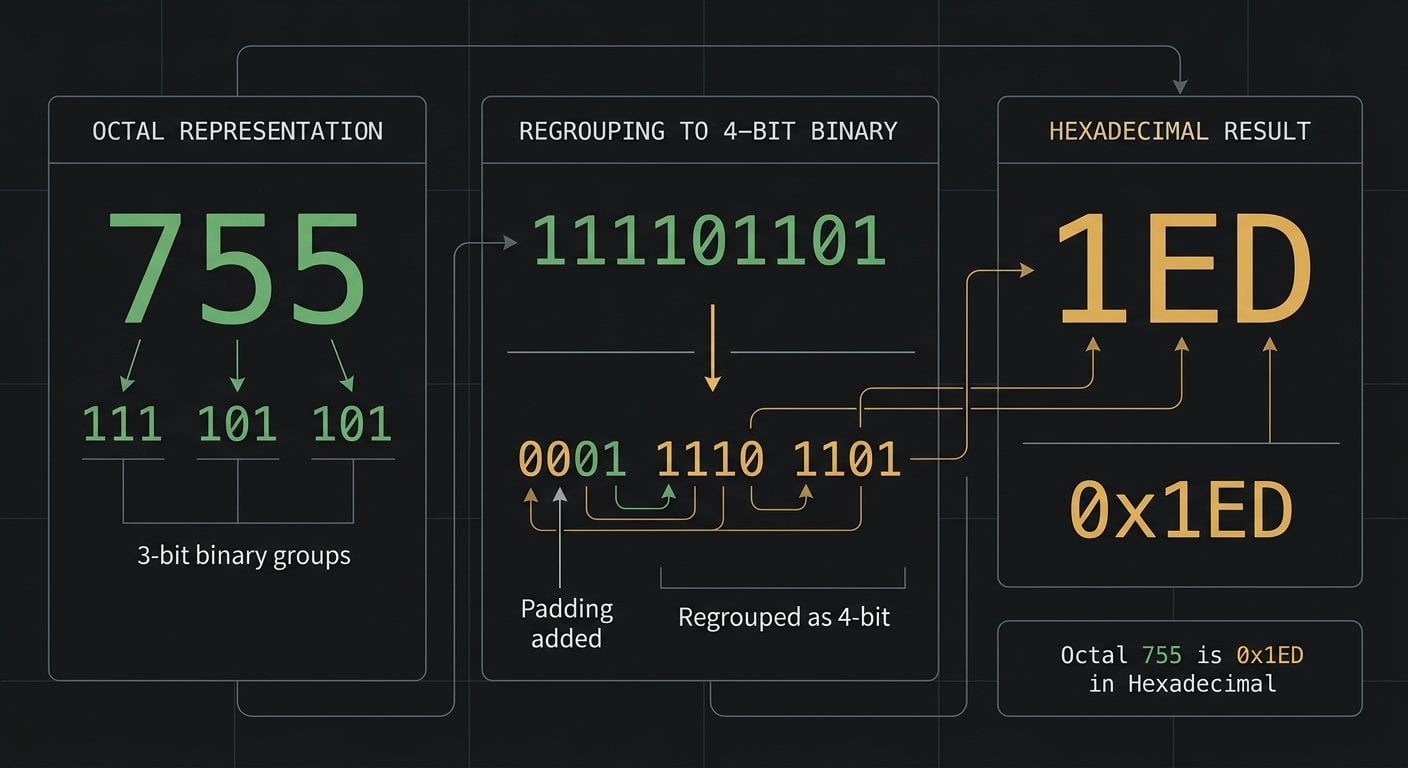
Worked Example: Octal 755 to Hex
This is the classic Unix permission value for "rwxr-xr-x".
Step 1 - Octal digits to 3-bit binary:
7=1115=1015=101
Step 2 - Join the bits: 111 101 101 becomes 111101101
Step 3 - Group into 4 bits from the right: 1 1110 1101 - pad the leftmost group: 0001 1110 1101
Step 4 - Convert each 4-bit group:
0001=11110=E1101=D
Result: Octal 755 = Hex 1ED
Second Example: Octal 644 to Hex
This is the standard permission for readable files (rw-r--r--).
6=1104=1004=100
Join: 110100100 - Group from right: 0001 1010 0100
0001=11010=A0100=4
Result: Octal 644 = Hex 1A4
Need to go the other direction? Use our hex to octal converter for the reverse operation.
Real-World Examples
1. Unix File Permissions
When you run ls -l on a Linux system, permissions like rwxr-xr-x are stored internally as octal 0755. Some security tools and log analyzers display these values in hex. Knowing that 0755 octal equals 1ED hex lets you read those logs without confusion.
2. Memory Addresses in Embedded Systems
Older microcontrollers (like early PIC chips) used octal addressing in their datasheets. Modern debuggers display addresses in hex. If you are porting firmware from a legacy platform, you will need to convert octal to hex to match register addresses correctly.
3. Color Values
While CSS colors use hex (like #FF5733), some older graphics tools output color channel values in octal. For example, an octal color component of 377 converts to hex FF - which is the maximum value (255 in decimal) for a color channel. This connects directly to how hex color codes map to RGB values.
4. Network and Protocol Data
Some network protocol specifications and older RFCs use octal notation for byte values. Converting those to hex makes it much easier to compare them against packet captures in tools like Wireshark, which always displays bytes in hexadecimal.
Code Examples in Python and C
Octal to Hex in Python
Python makes octal to hex in Python extremely simple. You can do it in a single line using built-in functions.
# Method 1: One-liner using int() and hex()
octal_value = "755"
hex_result = hex(int(octal_value, 8))
print(hex_result)  # Output: 0x1ed

# Method 2: Uppercase and clean output
hex_clean = hex(int(octal_value, 8))[2:].upper()
print(hex_clean)   # Output: 1ED

# Method 3: Function for reusable conversion
def octal_to_hex(octal_str):
    try:
        decimal_value = int(octal_str, 8)  # Parse as base-8
        return hex(decimal_value)[2:].upper()
    except ValueError:
        return "Invalid octal input"

# Test with real permission values
print(octal_to_hex("755"))   # 1ED
print(octal_to_hex("644"))   # 1A4
print(octal_to_hex("777"))   # 1FF
The key is int(octal_str, 8) which tells Python to parse the string as base-8. Then hex() converts that integer to hex. The [2:] slice removes the 0x prefix.
Octal to Hex in C
In C, you handle the conversion manually using strtol for parsing and printf for formatting.
#include <stdio.h>
#include <stdlib.h>

int main() {
    char octal_input[] = "755";
    long decimal_value;
    char hex_output[20];

    // strtol with base 8 parses the octal string
    decimal_value = strtol(octal_input, NULL, 8);

    // %lX formats as uppercase hex
    snprintf(hex_output, sizeof(hex_output), "%lX", decimal_value);

    printf("Octal %s = Hex %s\n", octal_input, hex_output);
    // Output: Octal 755 = Hex 1ED

    // Batch conversion example
    char *permissions[] = {"755", "644", "777", "600"};
    int count = 4;

    printf("\nPermission Conversion Table:\n");
    for (int i = 0; i < count; i++) {
        long val = strtol(permissions[i], NULL, 8);
        printf("Octal %-5s = Hex %lX\n", permissions[i], val);
    }

    return 0;
}
The strtol function is the right tool here because it handles the base conversion natively and is safer than manual parsing. The %lX format specifier outputs uppercase hex.
For other related conversions in your projects, you might also need octal to binary or binary to hex as intermediate steps.
Quick Reference Conversion Table
Here are common octal values with their decimal and hex equivalents for quick lookup:
| Octal | Decimal | Hexadecimal | Common Use |
|---|---|---|---|
777 |
511 | 1FF |
Full permissions (rwxrwxrwx) |
755 |
493 | 1ED |
Standard executable permission |
644 |
420 | 1A4 |
Standard file permission |
600 |
384 | 180 |
Private file (owner only) |
377 |
255 | FF |
Max single-byte value |
10 |
8 | 8 |
First octal rollover |
For a deeper look at how these number systems interact with each other, the Wikipedia article on octal provides a thorough reference, including historical context for why octal was used in early computing hardware.
Conclusion
Octal to hex conversion is one of those fundamentals that looks intimidating at first but becomes second nature quickly. The core trick is always the same: go through binary as the bridge. Each octal digit becomes 3 bits, you regroup into sets of 4 bits, and each group becomes a hex digit. Python handles this in one clean line, and C gives you precise control with strtol. Whether you are debugging permissions, analyzing memory, or porting legacy code, this skill removes friction from your workflow and makes you a sharper, more confident developer.
Convert Octal to Hex Instantly - Free Online Tool
Skip the manual steps. Paste any octal value and get the hex result immediately, with no setup or installation required.
Try Our Free Octal to Hex Converter →
Different systems and tools use different number bases. Unix file permissions are written in octal, while debuggers, memory analyzers, and modern APIs display values in hex. Converting between them lets you compare and use data across these environments without errors or misinterpretation.
The most common cases include reading Unix file permission values in security logs, porting firmware from legacy microcontrollers that used octal addressing, parsing older network protocol specifications, and converting color channel values from graphics tools that output in octal format.
Our free octal to hex converter handles the conversion instantly with no setup required. It is ideal for quick lookups, batch checks, and verifying your manual calculations or code output.
Yes. The most efficient method skips decimal entirely. Convert each octal digit to a 3-bit binary group, join the bits, regroup into 4-bit chunks from the right, then convert each chunk to hex. This binary bridge method is faster and less error-prone than going through decimal.
Python does not have a single dedicated function, but you can combine two built-ins: int(value, 8) to parse the octal string, and hex() to format the result as hexadecimal. The entire conversion takes one line of code and handles any valid octal input.