
Converting images into text strings might sound unusual, but base64 image encoding has become a practical technique for web developers looking to optimize page performance. This method transforms image files into data URIs that can be embedded directly into HTML and CSS, eliminating the need for separate HTTP requests. While this approach offers clear advantages for certain use cases, it's not a one-size-fits-all solution. Understanding when to use base64 encoding and when to stick with traditional image files can significantly impact your website's speed and user experience.
What Is Base64 Image Encoding?
Base64 encoding converts binary image data into ASCII text using a specific alphabet of 64 characters. This transformation allows images to be represented as text strings that can be embedded directly into web documents. The resulting data URI begins with a prefix indicating the MIME type, followed by the encoded image data.
A typical base64 data URI looks like this:
data:image/png;base64,iVBORw0KGgoAAAANSUhEUgAAAAUA...
Our Base64 Encode Image tool simplifies this conversion process. Upload your image file, and the tool generates the complete data URI ready for implementation. This encoded string can then be inserted directly into your HTML img tags or CSS background properties.

When to Use Base64 Image Encoding
Small Icons and UI Elements
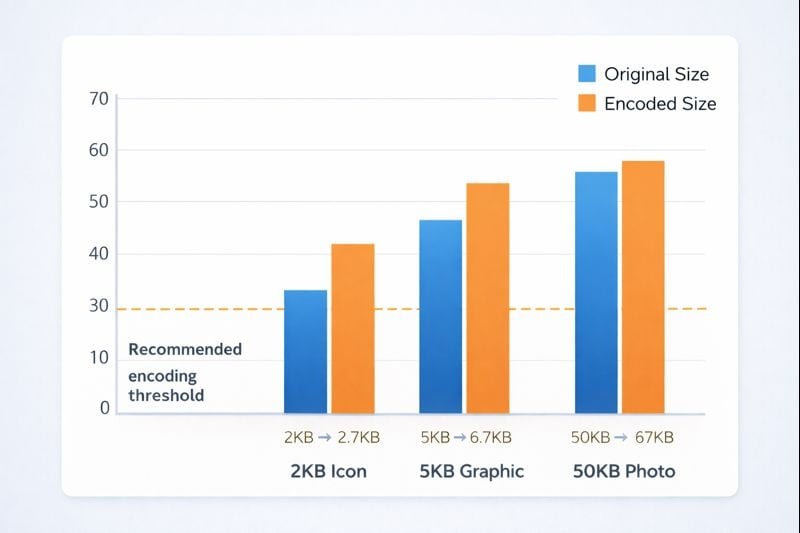
Base64 encoding works exceptionally well for small icons, logos, and interface elements. These images typically range from 1KB to 5KB in size. When encoded, they increase by approximately 33% due to the text representation, but this trade-off is worthwhile. A 2KB icon becomes roughly 2.7KB when encoded, but you save an entire HTTP request.
For websites using dozens of small icons, this reduction in server requests can noticeably improve load times. Each eliminated request removes network latency, DNS lookup time, and connection overhead. The CSS Sprite Generator offers an alternative approach for managing multiple icons by combining them into a single image file.
Critical Above-the-Fold Images
Images that appear immediately when a page loads benefit from base64 encoding. Since the image data is embedded in the HTML or CSS, it renders instantly without waiting for additional file requests. This technique is particularly valuable for hero section backgrounds, logos, or essential graphics that define your page's initial appearance.
Critical rendering path optimization becomes simpler when key visual elements don't require separate downloads. Users see a complete, polished page faster, reducing perceived load time even if total data transfer remains similar.
When to Avoid Base64 Encoding
Large Photos and Graphics
Photographs, detailed graphics, and images larger than 10KB generally shouldn't be base64 encoded. The 33% size increase becomes significant with larger files. A 100KB photo becomes 133KB when encoded, adding substantial bloat to your HTML or CSS files. This extra data must be downloaded before the page can begin rendering, actually slowing performance.
Large encoded images also prevent browser caching benefits. When an image file is separate, browsers cache it for repeat visits. Base64 encoded images embedded in HTML or CSS get cached only if the entire document is cached, which happens less reliably.
SEO-Important Images
Search engines struggle to index base64 encoded images effectively. Product photos, content images, and any visuals you want appearing in Google Images should remain as standard image files. Traditional img tags with proper alt attributes and descriptive filenames provide much better SEO value.
Screen readers and accessibility tools also work better with standard images. While alt text can still be added to base64 images, the overall accessibility and discoverability suffer compared to conventional implementation.
Key Takeaways:
- Base64 encoding works best for small icons and critical above-fold images under 5KB
- Avoid encoding large photos, which become 33% bigger and prevent effective caching
- SEO-important images should remain as standard files for better search engine indexing
- Use the Base64 Encode Image tool for quick conversions and the Decode tool for verification
Implementing Base64 Images in Your Code
HTML Implementation
Adding a base64 encoded image to HTML is straightforward. Replace the src attribute value with your data URI:
<img src="data:image/png;base64,iVBORw0KGgo..." alt="Company logo">
The browser interprets the data URI exactly like a standard file path, rendering the image normally. This method works identically across all modern browsers.
CSS Background Images
CSS implementation follows the same pattern. Use the data URI as the background-image value:
background-image: url(data:image/png;base64,iVBORw0KGgo...);
This technique proves especially useful for button icons, decorative elements, and repeating patterns. Since CSS files are typically cached aggressively, the base64 data gets cached along with your stylesheet.
Testing and Verification
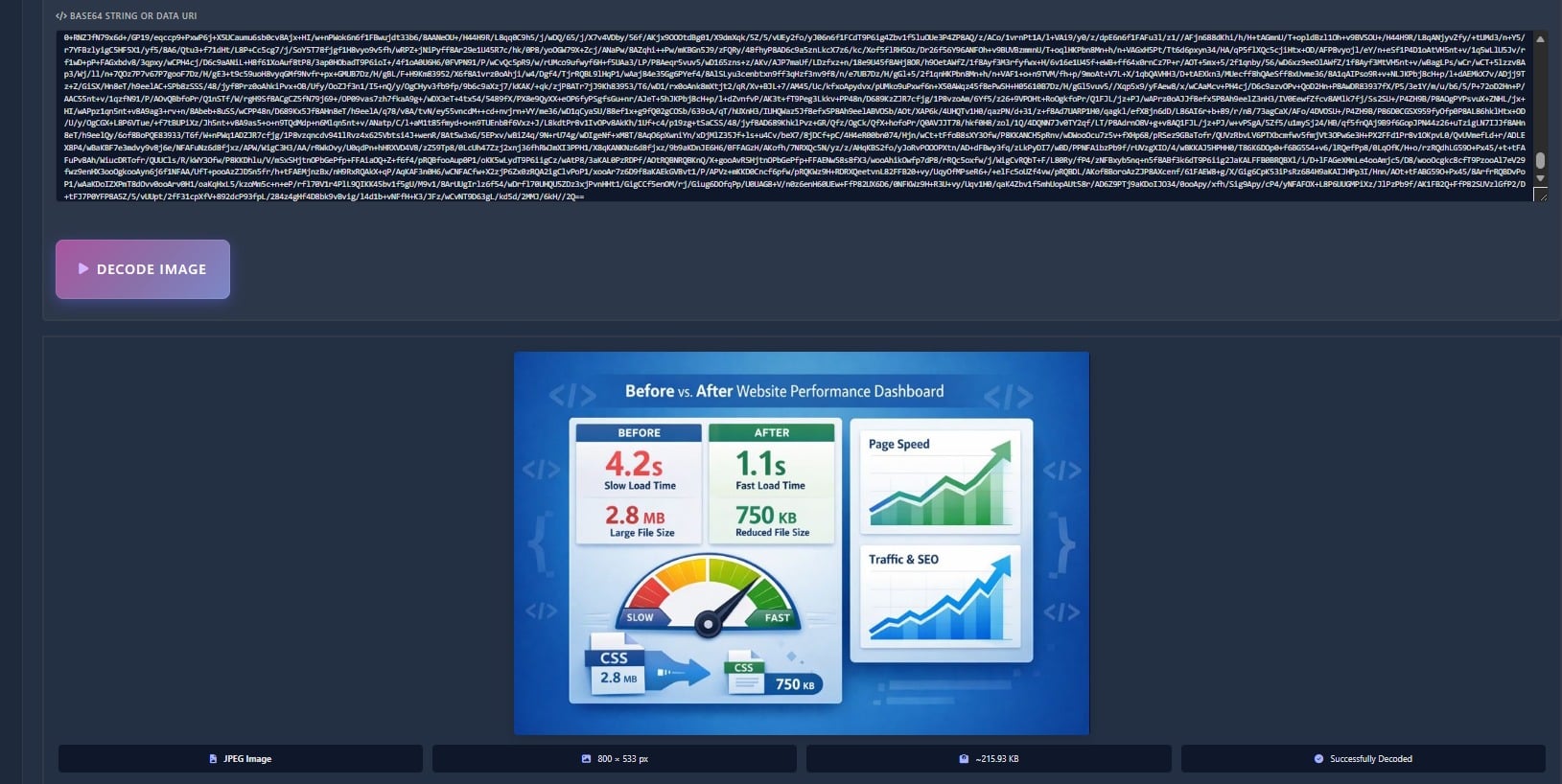
After encoding images, verification ensures the data URI works correctly. Our Base64 Decode Image tool converts data URIs back into viewable images. Paste your encoded string, and the tool displays the resulting image, confirming the encoding process completed successfully.
This verification step catches potential issues before deployment. Corrupted encoding, incorrect MIME types, or truncated data become immediately apparent. Testing decoded images in different browsers ensures consistent rendering across platforms.
Performance Trade-offs
Understanding the real performance impact requires examining specific scenarios. A webpage with ten 2KB icons makes ten separate HTTP requests totaling 20KB. After base64 encoding, these become approximately 27KB of inline data with zero additional requests.
The 7KB size increase is offset by eliminating request overhead. Each HTTP request adds roughly 100-200 milliseconds of latency on typical connections. Removing ten requests can save one to two seconds of load time, far outweighing the minor size increase.
However, a single 50KB photo encoded to 67KB provides no benefit. The 17KB bloat adds to initial page weight, and the lack of caching means repeat visitors download that extra data every time. Standard image files with proper cache headers perform much better in this scenario.
Conclusion
Base64 image encoding serves as a valuable optimization technique when applied appropriately. Small icons, logos, and critical above-the-fold graphics benefit from inline embedding through reduced HTTP requests and faster initial rendering. The Base64 Encode Image tool makes implementation simple, while the Decode tool provides essential verification. However, large photos, SEO-important images, and content graphics should remain as standard files to maintain caching benefits, search engine visibility, and reasonable file sizes. Evaluate each image individually based on size, purpose, and performance goals to determine the best approach for your specific needs.
FAQ
Yes, base64 encoding increases image file size by approximately 33%. A 3KB icon becomes roughly 4KB when encoded. This size increase is acceptable for small images where eliminating HTTP requests provides greater performance benefits than the minor size penalty.
Search engines have limited ability to index base64 encoded images compared to standard image files. For SEO purposes, product photos, content images, and any visuals you want appearing in image search results should use traditional img tags with descriptive filenames and alt attributes.
Images under 5KB work best for base64 encoding. This includes small icons, logos, and simple graphics. Images between 5KB and 10KB require careful evaluation. Anything larger than 10KB should typically remain as separate files to avoid excessive HTML/CSS bloat and maintain caching benefits.
All modern browsers fully support base64 encoded images in both HTML and CSS. This includes Chrome, Firefox, Safari, Edge, and mobile browsers. The data URI scheme has been widely supported for many years, making it a reliable technique for current web development.
Use the Base64 Decode Image tool to convert encoded strings back into viewable images. Simply paste your data URI into the tool, and it will display the decoded image. This verification process helps ensure your encoding worked correctly before implementing it in production code.