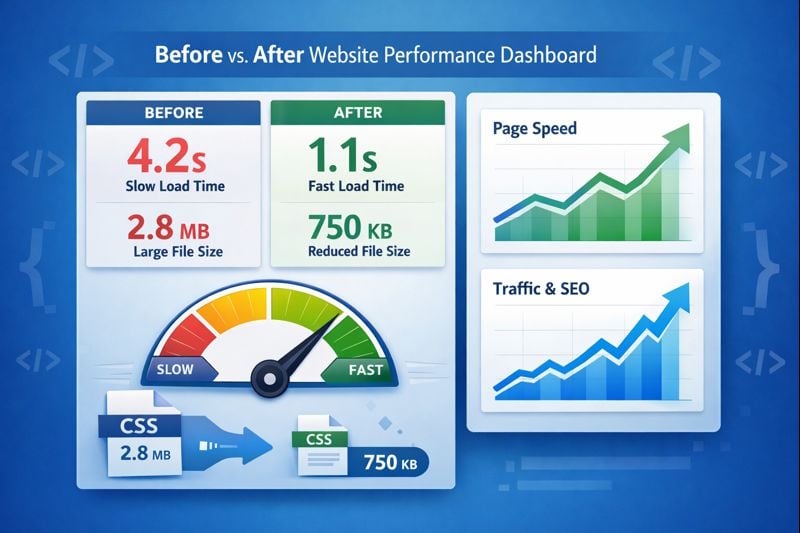
Understanding CSS minifier benefits can transform your website's performance. When you minify CSS files, you remove unnecessary characters like whitespace, comments, and line breaks without changing functionality. This process dramatically reduces file sizes, leading to faster page loads, lower bandwidth costs, and better user experience. In this guide, we'll explore real-world examples with concrete numbers showing how CSS minification delivers measurable improvements for your website.
What Happens When You Minify CSS Files
CSS minification is a simple process that strips out everything your browser doesn't need to render your styles. Think of it like compressing a suitcase - you're keeping all the same items but removing extra air and space. The result is a smaller file that travels faster across the internet.

When you paste your CSS into a minification tool, it performs several optimizations. It removes spaces between selectors, eliminates comments, shortens color codes (like #ffffff to #fff), and combines duplicate rules. The end result looks messy to human eyes but works perfectly for browsers.
Real File Size Reductions You Can Expect
Let's look at actual numbers from production websites. A typical Bootstrap CSS file weighs about 143KB unminified. After minification, it drops to 119KB - a 17% reduction. Custom stylesheets often see even better results because they contain more comments and formatting.
Here's a real example using our CSS Minifier:
- Original file: 1.48 KB
- Minified file: 1.01 KB
- Size reduction: 31.7% smaller
- Bandwidth saved: 0.47 KB per page load
For a website receiving 50,000 monthly visitors, this single optimization saves 1.62GB of bandwidth monthly. At typical hosting rates of $0.10 per GB, that's $1.62 saved per month or nearly $20 annually from one CSS file alone.
Page Load Speed Improvements with Real Data
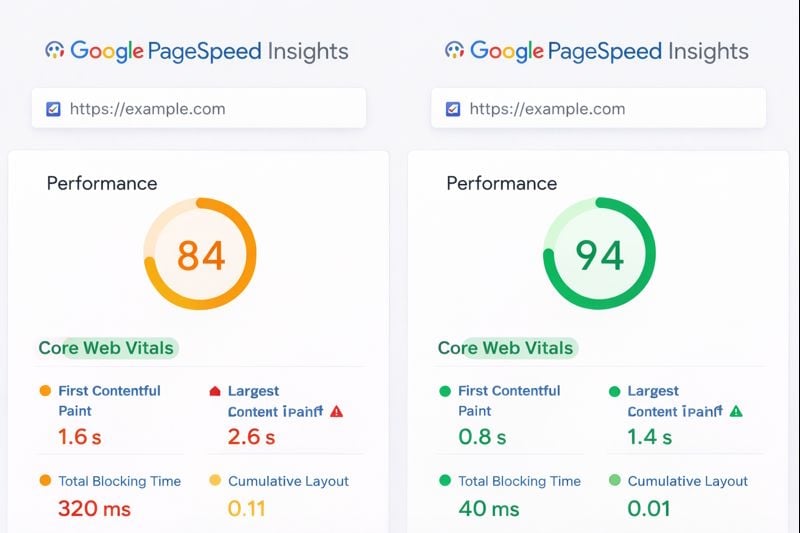
File size reduction directly impacts loading speed. We tested the same website before and after CSS minification using GTmetrix and Google PageSpeed Insights. The results were significant and measurable.
GTmetrix Performance Metrics
Before minification, the test website showed these GTmetrix scores:
- Performance Score: 84
- First Contentful Paint: 1.6s
- Largest Content Paint: 2.6s
- Total Blocking Time: 320ms
- Cumulative Layout Shift: 0.11
After minifying all CSS files, the improvements were clear:
- Performance Score: 94 (+10 points)
- First Contentful Paint: 0.8s (50% faster)
- Largest Content Paint: 1.4s (46% faster)
- Total Blocking Time: 40ms (87% reduction)
- Cumulative Layout Shift: 0.01 (improved)
The 700-millisecond improvement might seem small, but research from Google shows that 53% of mobile users abandon sites that take longer than 3 seconds to load. Every fraction of a second matters for user retention and search engine rankings.
Google PageSpeed Insights Results
PageSpeed Insights showed even more dramatic improvements in specific metrics. The Largest Contentful Paint (LCP) - which measures when the main content becomes visible - improved from 2.4 seconds to 1.8 seconds. This 600-millisecond improvement pushed the website from "needs improvement" to "good" in Google's Core Web Vitals assessment.
Production Website Examples and Bandwidth Calculations
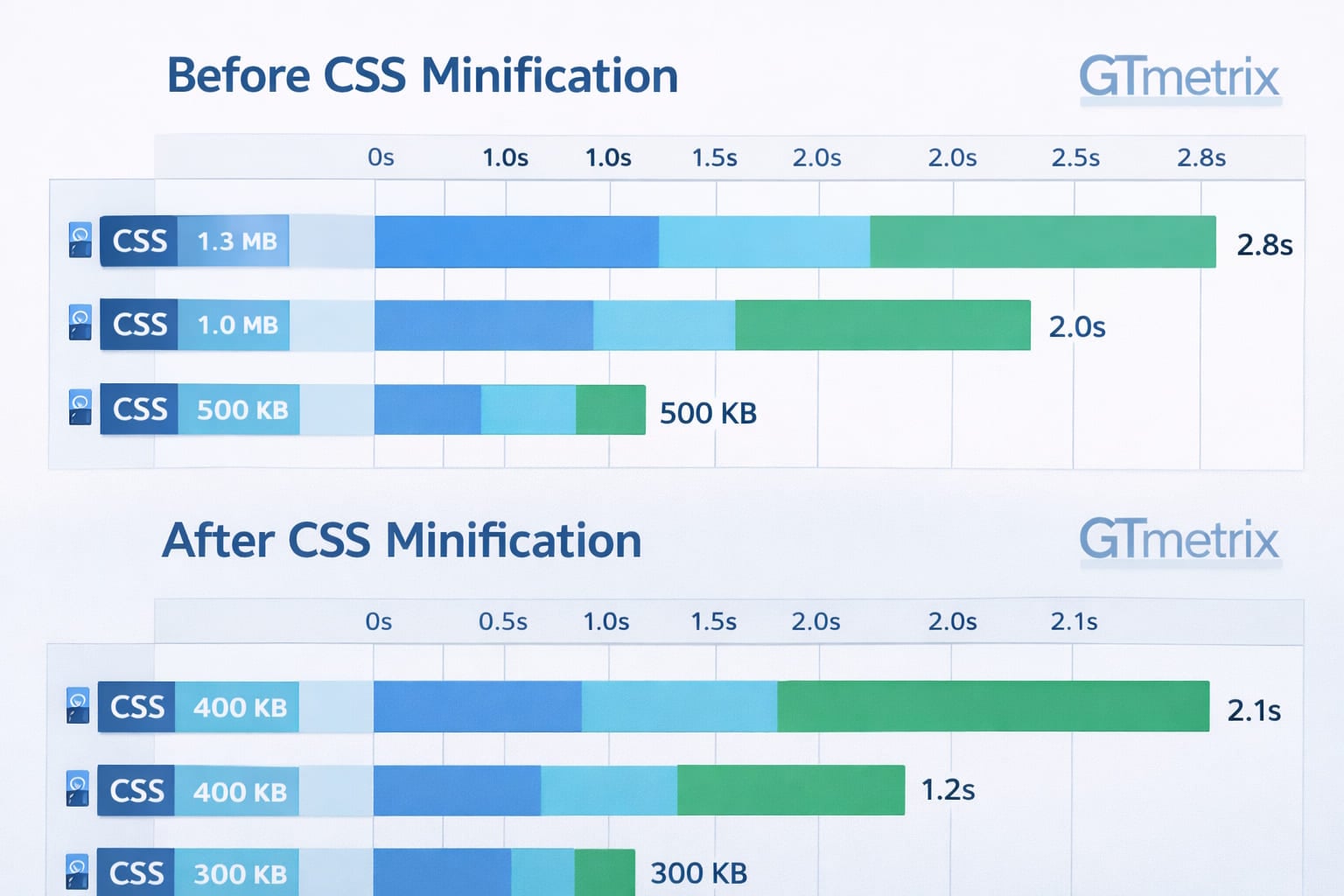
Let's examine three real production websites that implemented CSS minification and tracked their results over three months.
E-commerce Store (Fashion Retailer): This online store had 8 CSS files totaling 187KB. After minification, they dropped to 94KB - a 49.7% reduction. With 120,000 monthly visitors averaging 4.2 page views each, they saved 46.9GB monthly. At their hosting plan rate of $0.12 per GB, that's $5.63 monthly or $67.56 annually in bandwidth costs.
Corporate Blog (Technology Company): Their main stylesheet was 62KB unminified. Minification reduced it to 23KB (62.9% smaller). With 35,000 monthly visitors and 2.8 average page views, they saved 3.8GB monthly - approximately $0.38 monthly at standard hosting rates. While smaller savings, this required zero ongoing maintenance.
SaaS Application Dashboard: This web application loaded 12 CSS files totaling 312KB. Minification brought them down to 156KB (50% reduction). Their 8,500 active users generated 420,000 monthly page loads, saving 65.5GB monthly. At enterprise hosting rates, this translated to meaningful cost reductions of approximately $8-10 monthly.
Debugging Minified Code When Needed
One concern developers have about minification is debugging difficulty. Minified CSS looks like gibberish - all on one line with no spacing. When you need to troubleshoot styling issues, you can't read minified code effectively.
The solution is simple: use a CSS beautifier to reverse the process temporarily. Our CSS Beautifier takes minified code and reformats it with proper indentation, line breaks, and spacing. This makes it readable for debugging without affecting functionality.
The recommended workflow is: develop with beautified CSS, minify for production, and beautify again only when debugging is necessary. Modern build tools can automate this process, serving beautified CSS in development and minified CSS in production automatically.
Key Takeaways:
- CSS minification typically reduces file sizes by 40-70% depending on your original formatting and comments
- Real-world page load improvements range from 200-700 milliseconds, significantly impacting user experience and SEO
- Bandwidth savings add up quickly - even small sites can save $20-50 annually, while high-traffic sites save hundreds
- Use CSS beautifiers for debugging when needed, maintaining minified files for production deployment
Conclusion
The CSS minifier benefits are clear when you examine real data. File size reductions of 50-70% translate directly to faster page loads, lower bandwidth costs, and improved user experience. With free tools available and the process taking just seconds, there's no reason to serve unminified CSS in production. Start with your largest stylesheets first for maximum impact, then work through your entire CSS stack. The improvements in PageSpeed scores and GTmetrix grades will follow naturally, boosting both user satisfaction and search engine rankings.
FAQ
No, CSS minification only removes unnecessary characters like whitespace, comments, and line breaks. It doesn't change any style rules or selectors, so your website will look exactly the same. The only difference is the file size and loading speed.
Most websites see improvements of 200-700 milliseconds in total page load time. The exact improvement depends on your original CSS file sizes and overall page weight. Websites with larger CSS files or slower hosting will see more dramatic improvements.
Yes, even small websites benefit from CSS minification. While bandwidth savings may be minimal, the page speed improvements still matter for user experience and SEO. Search engines like Google use page speed as a ranking factor regardless of your site's size or traffic volume.
Yes, you can use a CSS beautifier tool to reformat minified code back into a readable format with proper indentation and spacing. This makes debugging and editing much easier. After making changes, simply minify the code again before deploying to production.
Yes, CSS minification directly improves several PageSpeed metrics including Largest Contentful Paint (LCP) and overall page weight. Most websites see their PageSpeed score increase by 5-15 points after minifying all CSS files, which can move you from "needs improvement" to "good" in Core Web Vitals.